Here are a few more examples of processed footage using my retro analog video processing network described in my previous post:
UTE Fire Dance
Prayer Wheel
Prayer Wheel
Ancestors

Here are a few more examples of processed footage using my retro analog video processing network described in my previous post:
Another very interesting and powerful tool available on the Mac is PhotoMosh Pro (now called Mosh Pro). While this is not a real time processing app -- i.e.: the work screen shows an approximation of real time effects, but any final patch needs to be 'recorded' (exported) explicitly to create an output file for further use...
What is nice about this app is that it has a huge range of effects (most of which have parameter adjustments that can be controlled manually or by LFOs and such), but presents itself as a stackable array of such processing steps (with processing order able to be swapped as desired). It's really quite powerful as you can see below in a few samples - including a Rutt-Etra like effect.
Eric Souther (Philosophical Tools on Patreon) has released a new Touch Designer TOX processing network based upon the 8 channel Color Mixer hardware device developed by David Jones. I initially encountered the color mixer while at my first Experimental TV Center artist residency in 1987 - and I immediately fell in love with the beautiful layering of multi channel video "slices", each of which could be keyed and colorized independently before being summed together on output. Eric's TOX network provides a nice emulation of the original hardware mixer.
The sample footage I'm sharing originates from my original video tape library documenting visits in the early 1990s to several Mayan sites including Chichén Itzá and Cobol in the Yucatan Peninsular of Mexico. Selections have been fed thru the Color Mixer processing network to achieve my desired look and texture.
Note that edited / selected segments of these raw processing flows will be used in my upcoming River Styx video: the specific section of the program deals with the Journey thru the Mayan Underworld (descent into flames and darkness) and the Voyage to the Ancestors (climbing the sacred mountain into the Sky realms).
It's not that I haven't been making stuff, but I've been unfocused in terms of posting stuff.
I've done a lot more Prayer Wheel explorations using the Signal Culture Re:Struktr app. I've also gotten much deeper into Touch Designer processing networks as well over the last few months. And I've done more work on my River Styx video script - including investigating / testing various text-to-audio AI services. So far, I'm leaning towards ElevenLabs voices...
So, next I'll be posting sample stuff in a somewhat chronological order next.
This new app from Signal Culture allows very interesting wave-form driven flicker-based transitions between two channels of video. In this example, a number of Signal Culture apps were used in tandem: Input Amp -> Proc Amp -> Frame Buffer -> Re:Struktr -> Syphon Recorder. (Turn on audio!)
This new app allows very interesting wave-form driven flicker-based transitions between two channels of video. Very powerful. In this example, sine & triangle wave driven flicker transitions have been increased to a fast rate and keying & color tinting features have been utilized. (Turn on audio!)
Here are some (.gif) samples of the range of video processing that I have been applying to footage of a 'Spirit Bark' assemblage sculpture by the artist team Sylvain and Ghyslaine Staëlens that I recorded at 2022 Outsider Art Fair in NYC.
Eventually, selected segments are destined to be included in my currently under script development multi-part video program entitled 'Crossing the Styx.'


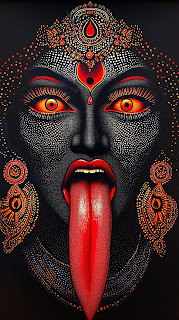
Here are some sample processed frames using a Kali image (the final image below is the input source).


Taking some time to play around with glitch processing via Audacity audio editor, importing .bmp, .jpg, and ,tif files (as raw data), manipulating them with filters, then saving stuff back out (as "raw" data) once again. I find .jpgs are not worth the hassle and really don't achieve much more than linear runs of pixels or complete noise. Of the other two formats, I like the some of the complex RGB spacial layering effects when applied to .tif files that have been saved as planar data (RRRGGGBBB).
Here are two examples of .gif animations built up out of processed frames.


In the first demo using my Ghost Bark footage, several of the colorizer bands have 'live' fire video inserted into them from a second file.
The second sample of Eric Souther's TD Colorizer shows the effect of the temporal mapper with the flames video being the displacement map applied to the colorized Ancestors footage.
The final sample shows the effect of the temporal mapper with a low rez star sky rotation time lapse video being the displacement map.
It's great to see new digital tools developed based upon analog tools (in this case multi-channel colorizers) designed in the 70s and 80s by artists like Bruce Hern or David Jones.
Note: even those the last two samples are SD rez, the Colorizer can handle up to 4K 60hz processing input / output.
A related post - here is the same 'ghost bark' footage (from previous post below) processed thru Touch Designer using a custom-built network I've named "Phosportron4" - after a MAX-based standalone app ("Phosphortron") build a few years ago by Eric Souther & Laura McGough. Like Eric, I tried to emulate the main visuals relating to old green phosphor CRTs - "blur" (decay), "burn-in", and "edge detection." Also, included the ability to mix between source footage and phosphor-induced footage.
After those examples posted previously (below), you might ask just how would I incorporate reaction diffusion into my video work? Here is an example compositing with my 'ghost bark' footage.
Where have I been? No recent postings... Busy learning Touch Designer over the last month or so. Here is a sample of some reaction diffusion processing via Touch Designer. My inspiration came from VJ Kuru who was referring to an informative TD demo by Razieh Kooshki on youtube: https://youtu.be/1YyPJe9nEkA
I wasn't happy with the original version of my Spirit Bark panoramic piece, so I decided to take another pass at it. I think the newest version (#2 below) is a lot more dynamic and also conveys the sense of the bark (spirit boat) better.
(See previous post Still Frames Timelapse showing processed video footage of sculptures by the artist team Sylvain and Ghyslaine Staëlens - shot by me at the 2020 Outsider Art Fair, NYC.)

Here are a few samples of processing a Celestial Dancer clip for my River Styx project.
The processing includes use of a custom edge-ringing glitch circuit (developed during Sean Hallowell's Intro to Video Circuits class on Polyphase Portal - discussed previously) with additional layering / luma keying / color correction on OBS.
Here are a few samples of processing Ancestors footage (originally shots of various museum displays of Greek and Roman statues) for my River Styx project.
The processing includes use of a custom edge-ringing glitch circuit (developed during Sean Hallowell's Intro to Video Circuits class on Polyphase Portal - discussed previously) with additional layering / color correction on OBS.
Here are a few samples of processing the Cambridge punting footage for my River Styx project.
The processing includes use of a custom edge-ringing glitch circuit (developed during Sean Hallowell's Intro to Video Circuits class on Polyphase Portal - discussed previously).
Continuation of previous post: using OBS, overlayed (source) footage with Wobbulated version of same, including feedback camera processing and additional layers of pre-recorded material. Also, layered in processed footage from a custom video circuit developed during Sean Hollowell's Intro to Video Circuits class (at Polyphase Portal).
Here are some more samples of resulting processed footage:
I finally got the kinks worked out of my system configuration and now can overlay recorded (source) footage with Wobbulated version of same (sometimes luma keyed), layer in other pre-recorded material (flames, fog), and also include feedback camera processing.
Here are some samples of resulting processed footage:
As part of my ongoing process of OBS discovery and use, I recently was able to configure my system flow to support both my Wobbulator rescan feed AND the original feed being sourced to the Wobbulator. There is a slight delay of a frame or two perhaps, but most importantly this allows synchronized key overly effects to be recorded.
As a note, I've found the Camo Studio app (for Mac) to be extremely useful in processing the video feed from my rescan camera (a Hi8 camcorder). It allows full control over frame resolution and frame rate, signal parameters such as luma, gamma, saturation, sharpness, as well as adjustment of zoom and relative placement/offset of the raster image. This latter function makes it easy to align the camera rescan manually - to center it and zoom to eliminate the CRT borders as desired.
So for your enjoyment below are a few samples of my "go to" rowing video clip showing various FXs and overlays.
Here are some examples of using and audio reactive OBS scale-to-sound plugin for processing of the footage of Sylvain and Ghyslaine Staëlens's spirit sculptures that I had originally recorded at the 2022 Outsider Art fair. (Note other processing samples these posted previously.)
Here are some examples of OBS processing of the footage of Sylvain and Ghyslaine Staëlens's spirit sculptures that I recorded at the 2022 Outsider Art fair. (Note other processing samples these posted previously.) Several of these examples show great feedback depth due to luma keying out the white gallery walls.
Some nice samples of OBS processing of a Celestial Dancer.
Final examples of video FX processing found footage of Golden Butoh (Daidogei) Dance Troupe from Japan. The samples are all based upon feedback processing and reaction diffusion rescan effects within OBS.
Demons or tormented souls for possible inclusion in River Styx video program.
Now something a bit different - audio reactive processing examples of video FX processing found footage of Golden Butoh (Daidogei) Dance Troupe from Japan. The samples are all based upon feedback processing and several available plugins (Move Transition, Scale to Sound) within OBS.
Demons and/or Celestial Dancer for possible inclusion in River Styx video program. Or just plain fun?
Now some more examples of video FX processing found footage of Golden Butoh (Daidogei) Dance Troupe from Japan. The samples are all based upon feedback processing within OBS.
Demons and/or Celestial Dancer for possible inclusion in River Styx video program.
As mentioned in the previous post, as part of the class "homework" assignment, Andrei Jay tasked participants to focus on generation of reaction diffusion field patterns in OBS feedback processing. In these experiments, a video of lightning is used to help "trigger" the diffusion patterns.
As part of the class "homework" assignment, Andrei Jay tasked participants to focus on generation of reaction diffusion field patterns in OBS feedback processing. (Such diffusion patterns are a common element of Andrei's own work, as well as his hardware devices such as the RPi-based Waaave Pool and the new HD-based Gravity Waaaves. [You can find to more about his image processing products here.]
To get these reaction diffusion effects, it's important that the feedback camera be zoomed into the source frame pretty deeply (unlike the feedback shown in the previous post of rowing on the lake - where the camera was not zoomed in at all). Also, constant fine readjusting of various color correction filters such as gamma, saturation, brightness, and contrast is required to trigger and maintain the diffusion feedback generation.
I recently started a class in video art techniques using OBS - being taught by Andrei Jay thru polyphaseportal.xyz. The first class covered basic feedback techniques, filters, and whatnot. So I wanted to play around with processing based upon an input video clip - in this case my favorite River Styx 'standby' snippet of rowing on the lake.
The format (framing layout) is based upon my desire to keep some of the original source "seed" visible (on the left 1/3 of the screen), allowing the feedback slices to trail off to the right. Here are a few samples of the results:


You may download or copy any image file (limit of 3) for use in your website as long as proper credit is provided: "Copyright 2003-2025 by Mark Gilliland - http://www.image-maya.org" This credit tag may be included as a caption, or alternatively within the IMG element's "ALT" attribute. (See details of the Creative Commons Attribution-No Derivative Works 3.0 License via link below.)

Please email to notify me about any such use of my art. Thank-you.

 Posts
All Comments
Posts
All Comments


